
Life Cycle of Bean

The life cycle of Bean is easy to understand When a bean is instantiated, it may be required to perform some initialization to get it into a usable state. Similarly, when the bean is no longer required and is removed from the container, some cleanup may be required.

you can use init-method and destroy-method as an attribute in bean configuration file for the bean to perform certain actions upon initialization and destruction.

Initialization – org.springframework.beans.factory.InitializingBean interface  contains one single method “void afterPropertiesSet() throws Exception;”

Destruction – org.springframework.beans.factory.DisposableBean interface  contains one single method “void destroy() throws Exception;”

Lets Implement

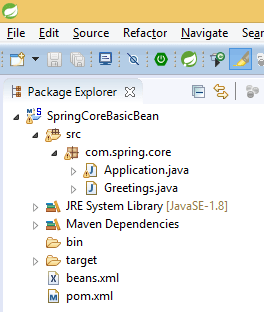
Project structure be like below image

1

add the dependency in pom.xml file –

<dependency>
     <groupId>org.springframework</groupId>
     <artifactId>spring-context</artifactId>
     <version>4.3.4.RELEASE</version>
</dependency>

bean class “Greetings.java

package com.spring.core;
public class Greetings {
    private String message;
    public String getMessage() {
        return message;
    }
    public void setMessage(String message) {
        this.message = message;
    }
    public void init() {
        System.out.println("Init");
    }
    public void destroy() {
        System.out.println("Destroy");
    }
}

beans.xml file is in the classpath

<?xml version="1.0" encoding="UTF-8"?>
<!DOCTYPE beans PUBLIC "-//SPRING//DTD BEAN 2.0//EN"
        "http://www.springframework.org/dtd/spring-beans-2.0.dtd">
<!-- use any one either type 1 or type 2 -->
<!-- type 1 -->     
<beans>
    <bean id="greet" class="com.spring.core.Greetings" init-method="init" destroy-method="destroy">
        <property name="message" value="Hello One"></property>
    </bean>
</beans>

<!-- type 2 -->
<beans default-init-method="init" default-destroy-method="destroy">
    <bean id="greet" class="com.spring.core.Greetings">
        <property name="message" value="Hello One"></property>
    </bean>
</beans>

Main class

package com.spring.core;
import org.springframework.context.support.AbstractApplicationContext;
import org.springframework.context.support.ClassPathXmlApplicationContext;
public class Application { 
    public static void main(String[] args) {
        AbstractApplicationContext context = new ClassPathXmlApplicationContext("beans.xml");
        Greetings greet = (Greetings) context.getBean("greet"); 
        System.out.println(greet.getMessage());
        context.registerShutdownHook();
    }
}

Output –

Dec 28, 2016 12:29:18 PM org.springframework.context.support.ClassPathXmlApplicationContext prepareRefresh
INFO: Refreshing org.springframework.context.support.ClassPathXmlApplicationContext@300ffa5d: startup date [Wed Dec 28 12:29:18 IST 2016]; root of context hierarchy
Dec 28, 2016 12:29:18 PM org.springframework.beans.factory.xml.XmlBeanDefinitionReader loadBeanDefinitions
INFO: Loading XML bean definitions from class path resource [beans.xml]
Init
Hello One
Dec 28, 2016 12:29:18 PM org.springframework.context.support.ClassPathXmlApplicationContext doClose
INFO: Closing org.springframework.context.support.ClassPathXmlApplicationContext@300ffa5d: startup date [Wed Dec 28 12:29:18 IST 2016]; root of context hierarchy
Destroy

For more details – watch video

Thanks for reading 🙂

Please Subscribe our you tube channel Almighty Java

Bean Factory vs Application Context

Bean Factory Hierarchy

  • public interface BeanFactory
  • public interface ListableBeanFactory extends BeanFactory
  • public interface ConfigurableListableBeanFactory extends ListableBeanFactory, AutowireCapableBeanFactory, ConfigurableBeanFactory
  • public class DefaultListableBeanFactory extends AbstractAutowireCapableBeanFactory implements ConfigurableListableBeanFactory, BeanDefinitionRegistry, Serializable
  • public class XmlBeanFactory extends DefaultListableBeanFactory

Ex – BeanFactory factory = new XmlBeanFactory(new ClassPathResource(“beans.xml”));

Application Context Hierarchy

  • public interface ApplicationContext extends ListableBeanFactory, HierarchicalBeanFactory, MessageSource, ApplicationEventPublisher, ResourcePatternResolver
  • public interface ConfigurableApplicationContext extends ApplicationContext
  • public abstract class AbstractApplicationContext extends DefaultResourceLoader implements ConfigurableApplicationContext
  • public abstract class AbstractRefreshableApplicationContext extends AbstractApplicationContext
  • public abstract class AbstractRefreshableConfigApplicationContext extends AbstractRefreshableApplicationContext
  • public abstract class AbstractXmlApplicationContext extends AbstractRefreshableConfigApplicationContext
  • public class ClassPathXmlApplicationContext extends AbstractXmlApplicationContext

Ex – ApplicationContext context = new ClassPathXmlApplicationContext(“beans.xml”);

Bean Factory

  • Bean instantiation/wiring.
  • It exists for backward compatibility.
  • Manual BeanPostProcessor registration
  • Support Lazy loading – It instantiates bean when you call getBean() method.
  • It is OK for testing and non-production use.

Application Context

  • Bean instantiation/wiring.
  • Automatic BeanPostProcessor registration.
  • Automatic BeanFactoryPostProcessor registration.
  • Convenient MessageSource access (for i18n).
  • ApplicationEvent publication – can publish events to beans that are registered as listeners.
  • Support Annotation-based dependency Injection. -@Autowired, @PreDestroy
  • Support many enterprise services such JNDI access, EJB integration, remoting.
  • Support Aggressive loading – It instantiates Singleton bean when the container is started, It doesn’t wait for getBean() to be called.

12

For more detail – watch below video


Thanks for reading 🙂

Please Subscribe our you tube channel Almighty Java
What is Application Context ?

  • It is a descendant of Bean Factory and contains some additions functionality.
  • It is an interface for providing configuration information to an application.
  • There are multiple classes provided by spring framework that implements this interface and helps us use configuration information in applications.

All Known Super Interfaces

  • ApplicationEventPublisher
  • BeanFactory
  • HierarchicalBeanFactory
  • ListableBeanFactory
  • MessageSource
  • ResourceLoader
  • ResourcePatternResolver

All Known Sub Interfaces

  • ConfigurableApplicationContext
  • ConfigurablePortletApplicationContext
  • ConfigurableWebApplicationContext
  • WebApplicationContext

All know Abstract Classes

  • AbstractApplicationContext
  • AbstractRefreshableApplicationContext
  • AbstractRefreshableConfigApplicationContext
  • AbstractRefreshablePortletApplicationContext
  • AbstractRefreshableWebApplicationContext
  • AbstractXmlApplicationContext
  • AnnotationConfigApplicationContext
  • AnnotationConfigWebApplicationContext
  • ClassPathXmlApplicationContext
  • FileSystemXmlApplicationContext

All know Classes

  • GenericApplicationContext
  • GenericGroovyApplicationContext
  • GenericWebApplicationContext
  • GenericXmlApplicationContext
  • GroovyWebApplicationContext
  • ResourceAdapterApplicationContext
  • StaticApplicationContext
  • StaticPortletApplicationContext
  • StaticWebApplicationContext
  • XmlPortletApplicationContext
  • XmlWebApplicationContext

Lets Implement

Using class path –

Project structure be like below image

1

add a dependency on pom.xml file –

<dependency>
     <groupId>org.springframework</groupId>
     <artifactId>spring-context</artifactId>
     <version>4.3.4.RELEASE</version>
</dependency>

bean class “Greetings.java

package com.spring.core;
public class Greetings {
    private String message;
    public String getMessage() {
        return message;
    }
    public void setMessage(String message) {
        this.message = message;
    }
}

beans.xml file is in classpath so can access using “ClassPathXmlApplicationContext” class

<?xml version="1.0" encoding="UTF-8"?>
<!DOCTYPE beans PUBLIC "-//SPRING//DTD BEAN 2.0//EN"
        "http://www.springframework.org/dtd/spring-beans-2.0.dtd">  
<beans>
    <bean id="greet" class="com.spring.core.Greetings">
        <property name="message" value="Hello One"></property>
    </bean>
</beans>

Main class

package com.spring.core;
import org.springframework.context.ApplicationContext;
import org.springframework.context.support.ClassPathXmlApplicationContext;
public class Application {
    public static void main(String[] args) {
        ApplicationContext context = new ClassPathXmlApplicationContext("beans.xml");
        Greetings greet = (Greetings) context.getBean("greet"); 
        System.out.println(greet.getMessage());
    }
}

Using File System –

2

Everything is like above, only class name will change because previously we are reading file from classpath and now reading from file system so we’ll use “FileSystemXmlApplicationContext” class

package com.spring.core;
import org.springframework.context.ApplicationContext;
import org.springframework.context.support.ClassPathXmlApplicationContext;
import org.springframework.context.support.FileSystemXmlApplicationContext;
public class Application {
    public static void main(String[] args) {
        ApplicationContext context = new FileSystemXmlApplicationContext("beans.xml");
        Greetings greet = (Greetings) context.getBean("greet"); 
        System.out.println(greet.getMessage());
    }
}

For more detail, Please watch video –

Thanks for reading 🙂

Please Subscribe our you tube channel Almighty Java

What is Bean Factory ?

  • It is represented by the interface org.springframework.beans.factory. It is the main and the basic way to access the Spring container
  • It is built upon Factory Design Pattern that contains a collection of beans. The BeanFactory holds Bean Definitions of multiple beans within itself and then instantiates the bean whenever asked for by clients.
  • It provides DI / IOC mechanism for the Spring. It is the actual container which instantiates, configures, and manages a number of beans. It loads the beans definitions and their property descriptions from some configuration source (for example, from XML configuration file).

Lets Implement

Using classpath –

Project structure be like below image

1

add a dependency on pom.xml file –

<dependency>
     <groupId>org.springframework</groupId>
     <artifactId>spring-context</artifactId>
     <version>4.3.4.RELEASE</version>
</dependency>

bean class “Greetings.java

package com.spring.core;
public class Greetings {
    private String message;
    public String getMessage() {
        return message;
    }
    public void setMessage(String message) {
        this.message = message;
    }
}

beans.xml file is in classpath so can access using “ClassPathResource” class

<?xml version="1.0" encoding="UTF-8"?>
<!DOCTYPE beans PUBLIC "-//SPRING//DTD BEAN 2.0//EN"
        "http://www.springframework.org/dtd/spring-beans-2.0.dtd">  
<beans>
    <bean id="greet" class="com.spring.core.Greetings">
        <property name="message" value="Hello One"></property>
    </bean>
</beans>

Main class

package com.spring.core;
import org.springframework.beans.factory.BeanFactory;
import org.springframework.beans.factory.xml.XmlBeanFactory;
import org.springframework.core.io.ClassPathResource;
public class Application {
    public static void main(String[] args) {
        BeanFactory factory = new XmlBeanFactory(new ClassPathResource("beans.xml"));
        Greetings greet = (Greetings) factory.getBean("greet"); 
        System.out.println(greet.getMessage());
    }
}

Using File System –

2

Everything is like above, only class name will change because previously we are reading file from classpath and now reading from file system so we’ll use “FileSystemResource” class

package com.spring.core;
import org.springframework.beans.factory.BeanFactory;
import org.springframework.beans.factory.xml.XmlBeanFactory;
import org.springframework.core.io.FileSystemResource;
public class Application {
    public static void main(String[] args) {
        BeanFactory factory = new XmlBeanFactory(new FileSystemResource("beans.xml"));
        Greetings greet = (Greetings) factory.getBean("greet"); 
        System.out.println(greet.getMessage());
    }
}

For more detail, Please watch video –

Thanks for reading 🙂

Please Subscribe our you tube channel Almighty Java

What is Spring Framework ?

The Spring Framework is a Java platform that provides comprehensive infrastructure support for developing Java applications. Spring handles the infrastructure so you can focus on your application.

Spring enables you to build applications from “plain old Java objects” (POJOs) and to apply enterprise services non-invasively to POJOs. This capability applies to the Java SE programming model and to full and partial Java EE.

  • It is an open source Java platform and it was initially written by Rod Johnson and was first released under the Apache 2.0 license in June 2003.
  • It is an application framework and inversion of control container for the Java platform. The framework’s core features can be used by any Java application.
  • It is lightweight because of its POJO implementation. The Spring Framework doesn’t force the programmer to inherit any class or implement any interface. That is why it is said non-invasive.
  • It can be thought of as a framework of frameworks because it provides support to various frameworks such as Struts, Hibernate, Tapestry, EJB, JSF etc.
  • Loosely coupled and integrated framework for developing enterprise applications in java.

Examples of how you, as an application developer, can benefit from the Spring platform:

  • Make a Java method execute in a database transaction without having to deal with transaction APIs.
  • Make a local Java method a remote procedure without having to deal with remote APIs.
  • Make a local Java method a management operation without having to deal with JMX APIs.
  • Make a local Java method a message handler without having to deal with JMS APIs.

Thanks for reading 🙂

Please Subscribe our you tube channel Almighty Java