Aspect Oriented Programming (AOP) complements Object-Oriented Programming (OOP) by providing another way of thinking about program structure. The key unit of modularity in OOP is the class, whereas in AOP the unit of modularity is the aspect.
AOP entails breaking down program logic into distinct parts called so-called concerns. The functions that span multiple points of an application are called cross-cutting concerns and these cross-cutting concerns are conceptually separate from the application’s business logic.
Scenario where we should use AOP –
Logging
Auditing
Declarative Transactions
Security
Caching
AOP Concepts
Aspect: a modularization of a concern that cuts across multiple classes. Transaction management is a good example of a crosscutting concern in enterprise Java applications. In Spring AOP, aspects are implemented using regular classes (the schema-based approach) or regular classes annotated with the @Aspect annotation (the @AspectJ style).
JoinPoint: a point during the execution of a program, such as the execution of a method or the handling of an exception. In Spring AOP, a join point always represents a method execution.
Advice: action taken by an aspect at a particular join point. Different types of advice include “around,” “before” and “after” advice. Many AOP frameworks, including Spring, model an advice as an interceptor, maintaining a chain of interceptors around the join point.
Pointcut: a predicate that matches join points. Advice is associated with a pointcut expression and runs at any join point matched by the pointcut (for example, the execution of a method with a certain name). The concept of join points as matched by pointcut expressions is central to AOP, and Spring uses the AspectJ pointcut expression language by default.
A context can be said as the running environment that is provided to the current unit of work. It may be the environment variables, instance variables, state of the classes, and so on.
Like ServletContext represents the servlet’s environment within its container, Similar to ApplicationContext, which represents the Spring application’s core environment within the Spring container.
There are Servlet’s ServletContext, JSF’s FacesContext, Spring’s ApplicationContext, JNDI’s InitialContext, and all these contexts follow the Facade Pattern to Abstract the environment specific details to the end user, providing the interface methods to Interact with.
Spring Context Configuration
In Spring web applications, there are two contexts that get initialized at server startup, each of which is configured and initialized differently.
1.Application Context
2.Web Application Context
What is Application Context?
ApplicationContext defines the beans that are shared among all the servlets.
In ApplicationContext, Spring loads applicationContext.xml file and creates the context for the whole application using ContextLoaderListener that we define in our application’s web.xml.
applicationContext.xml is the root context configuration for every web application There will be only one application context per web application.
If you are not explicitly declaring the context configuration file name in web.xml using the contextConfigLocation param, Spring will search for the applicationContext.xml under WEB-INF folder and throw FileNotFoundException, if it could not find this file.
Beans that defines your business logic, database interaction and other stuff that has to be shared across servlets should reside in applicationContext.xml.
In the above configuration, we are asking Spring to load root-context.xml and create an Application Context from it.
If contextConfigLocation is not mentioned as in the above snippet, It will by default look for
/WEB-INF/applicationContext.xml
At server startup, ContextLoaderListener instantiates all bean defined in applicationcontext.xml assuming you have defined the following in context XML file :
The beans are instantiated from all four configuration files test1.xml, test2.xml, test3.xml, test4.xml
What is WebApplicationContext?
There can be multiple WebApplicationContext in a single web application.
It is another servlet specific context that is loaded based on the dispatcher servlets configured in the application’s web.xml file.
Each dispatcher servlet has its own servlet-context initialized from <servlet-name>-servlet.xml file.
This allows us to categorize the incoming requests based on the servlet’s URL-pattern and handle them accordingly, such that one of the dispatcher servlets could help serving the web pages via Controller, while another one could be used to implement a stateless REST web service.
We understand that a single web application can have multiple dispatcher-servlet configurations.
dispatcher-servlet.xml defines the beans that are related only to that servlet. Beans that deals with servlet requests/web requests like controllers, message converters, interceptors should reside in dispatcher-servlet XML.
If we want to change the name of the dispatcher-servlet file name or change its location, we can add init-param with contextConfigLocation as param-name, as can be seen below
So with spring-servlet init-param specified as in the above web.xml code snippet, Spring no more finds the dispatcher-servlet context file with the name spring-servlet.xml, but instead looks for the one specified as the init-param value for contextConfigLocation, i.e. spring-servlet.xml.
Object creations workflow
When tomcat starts, beans defined in dispatcher-servlet.xml are instantiated.
DispatcherServlet extends FrameworkServlet. In FrameworkServlet bean instantiation takes place for the dispatcher. In our case dispatcher is FrameworkServlet.
The beans are all instantiated from all four test1.xml, test2.xml, test3.xml, test4.xml. After the completion of bean instantiation defined in applicationcontext.xml then beans defined in dispatcher-servlet.xml are instantiated.
Instantiation order is root is application context, then FrameworkServlet.
Difference between the two contexts
ApplicationContext is the root-context that has bean configurations we might want to use (and re-use) across the entire application as singletons.
There can be multiple WebApplicationContexts for each of the dispatcher servlets we specify in our application’s web.xml.
WebApplicationContext internally extends ApplicationContext, and as a child inherits all the beans from its parent. So we can also override the parent bean within our WebApplicationContext.
It’s always better to keep a clear separation between middle-tier services such as business logic components and data access classes (which we prefer defining in the ApplicationContext XML), and web-related components such as controllers and view-resolvers (which we prefer defining in the respective dispatcher-servlet‘s WebApplicationContext).
Configuring contextLoaderListener is completely optional. We can boot up a Spring application with just the dispatcher-servlet, without even configuring contextLoaderListener (that loads up the root-context).
The <load-on-startup> is a tag element which appear inside <servlet> tag in web.xml.
This tag specifies that the servlet should be loaded automatically on the startup of the web application.
The <load-on-startup> value is a positive integer or 0 which specifies the servlets loaded order as per your business logic or what suits your application.
When the servlet is loaded by the container, its init() method is called.
If <load-on-startup> is the negative integer or the element is not presented then servlets will be loaded when the container decides it needs to be loaded.
DispatcherServlet is the class which manages the entire request handling process. Like a normal servlet DispatcherServlet also needs to be configured in the web deployment Descriptor(web.xml).By default, DispatcherServlet will look for a name dispatcher-servlet.xml to load the Spring MVC configuration.
Servlet Init Parameters. A servlets init() method is called when the servlet container loads the servlet for the first time.
If we want to change the name of the dispatcher-servlet file name or change its location, we can add init-param with contextConfigLocation as param-name, as can be seen below
The Spring container can autowire relationships between collaborating beans without using <constructor-arg> and <property> elements which helps cut down on the amount of XML configuration you write for a big Spring-based application.
Autowiring Modes
no – It is the default autowiring mode. It means no autowiring by default.
byname – The byName mode injects the object dependency according to the name of the bean. In such case, property name and bean name must be same. It internally calls setter method.
byType – The byType mode injects the object dependency according to type. So property name and bean name can be different. It internally calls setter method.
Constructor – The constructor mode injects the dependency by calling the constructor of the class. It calls the constructor having a large number of parameters.
autodetect – It is deprecated since Spring 3
Autowire using Annotation
To enable annotation need to add <context:annotation-config /> in XML file.
The @Autowired annotation provides more fine-grained control over where and how autowiring should be accomplished. The @Autowired annotation can be used to autowire bean on the setter method just like @Required annotation, constructor, a property or methods with arbitrary names and/or multiple arguments.
There may be a situation when you create more than one bean of the same type and want to wire only one of them with a property, in such case you can use @Qualifier annotation along with @Autowired to remove the confusion by specifying which exact bean will be wired.
package com.spring.core;
import org.springframework.context.ApplicationContext;
import org.springframework.context.support.ClassPathXmlApplicationContext;
public class Application {
    public static void main(String[] args) {
        ApplicationContext context = new ClassPathXmlApplicationContext("beans.xml");
        Greetings greetings = (Greetings) context.getBean("greetings");
        System.out.println(greetings.getGreetings2()+" : "+greetings.getGreetings2().getMessage());
    }
}
Output –
Dec 28, 2016 1:37:07 PM org.springframework.context.support.ClassPathXmlApplicationContext prepareRefreshINFO: Refreshing org.springframework.context.support.ClassPathXmlApplicationContext@300ffa5d: startup date [Wed Dec 28 13:37:07 IST 2016]; root of context hierarchyDec 28, 2016 1:37:07 PM org.springframework.beans.factory.xml.XmlBeanDefinitionReader loadBeanDefinitionsINFO: Loading XML bean definitions from class path resource [beans.xml]
com.spring.core.Greetings2@1ce92674 : Hello Spring
Lets Implement @Autowired using Annotation
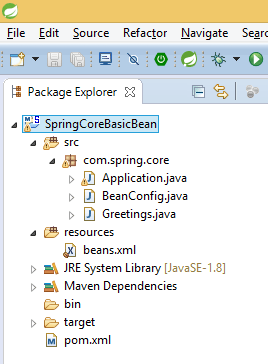
Project structure be like above image, Greetings2.java like the above
beans.xml need to enable annotation-driven
<?xml version="1.0" encoding="UTF-8"?>
<beans xmlns="http://www.springframework.org/schema/beans"
    xmlns:xsi="http://www.w3.org/2001/XMLSchema-instance" xmlns:context="http://www.springframework.org/schema/context"
    xsi:schemaLocation="http://www.springframework.org/schema/beans http://www.springframework.org/schema/beans/spring-beans-3.0.xsd
    http://www.springframework.org/schema/context http://www.springframework.org/schema/context/spring-context-3.0.xsd">
    <context:annotation-config />
    <bean id="greetings" class="com.spring.core.Greetings"></bean>
    <bean id="greetings2" class="com.spring.core.Greetings2">
        <property name="message" value="Hello Spring"></property>
    </bean>
    <!-- in this scenario we will use qualifier -->
    <!-- <bean id="greetings3" class="com.spring.core.Greetings2">
        <property name="message" value="Hello Spring 2"></property>
    </bean> -->
</beans>
bean class “Greetings.java”
package com.spring.core;
import org.springframework.beans.factory.annotation.Autowired;
public class Greetings {
    @Autowired
    //@Qualifier("greetings3")
    private Greetings2 greetings2;
    public Greetings2 getGreetings2() {
        return greetings2;
    }
    public void setGreetings2(Greetings2 greetings2) {
        this.greetings2 = greetings2;
    }
}
Application main class
package com.spring.core;
import org.springframework.context.ApplicationContext;
import org.springframework.context.support.ClassPathXmlApplicationContext;
public class Application {
    public static void main(String[] args) {
        ApplicationContext context = new ClassPathXmlApplicationContext("beans.xml");
        Greetings greetings = (Greetings) context.getBean("greetings");
        System.out.println(greetings+" : "+greetings.getGreetings2()+" : "+greetings.getGreetings2().getMessage());
    }
}
Output –
Dec 28, 2016 1:41:54 PM org.springframework.context.support.ClassPathXmlApplicationContext prepareRefreshINFO: Refreshing org.springframework.context.support.ClassPathXmlApplicationContext@300ffa5d: startup date [Wed Dec 28 13:41:54 IST 2016]; root of context hierarchyDec 28, 2016 1:41:54 PM org.springframework.beans.factory.xml.XmlBeanDefinitionReader loadBeanDefinitionsINFO: Loading XML bean definitions from class path resource [beans.xml]
com.spring.core.Greetings@543c6f6d : com.spring.core.Greetings2@13eb8acf : Hello Spring
@Configuration – Annotating a class with the @Configuration annotation indicates that the class will be used by Java Config as a source of bean definitions. An application may make use of just one @Configuration-annotated class or many. @Configuration can be considered the equivalent of XML’s element. Like, it provides an opportunity to explicitly set defaults for all enclosed bean definitions.
@Bean – It is a method-level annotation and a direct analog of the XML element. The annotation supports most of the attributes offered by such as init-method, destroy-method, auto wiring, lazy-init, dependency-check, depends-on and scope.
Dec 28, 2016 1:15:26 PM org.springframework.context.annotation.AnnotationConfigApplicationContext prepareRefreshINFO: Refreshing org.springframework.context.annotation.AnnotationConfigApplicationContext@5e9f23b4: startup date [Wed Dec 28 13:15:26 IST 2016]; root of context hierarchy
com.spring.core.Greetings@5cdd8682 : Hello Spring
com.spring.core.Greetings@d6da883 : Hello Spring
Let’s Implement Multiple POJO
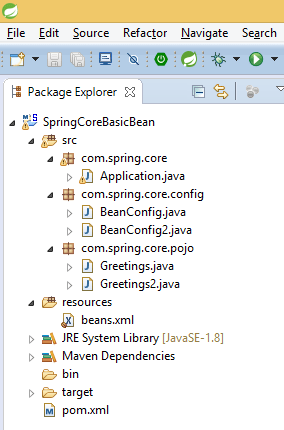
Project structure be like below image
beans.xml, BeanConfig, and Greetings like the above
bean class “Greetings2.java”
package com.spring.core.pojo;
public class Greetings2 {
private String message;
public String getMessage() {
return message;
}
public void setMessage(String message) {
this.message = message;
}
}
BeanConfig2
package com.spring.core.config;
import org.springframework.context.annotation.Bean;
import org.springframework.context.annotation.Configuration;
import com.spring.core.pojo.Greetings2;
@Configuration
public class BeanConfig2 {
@Bean
public Greetings2 createGreetings2() {
Greetings2 greetings2 = new Greetings2();
greetings2.setMessage("Hello Spring 2");
return greetings2;
}
}
Application Main class – so multiple configurations is there then need to register
Dec 28, 2016 1:22:57 PM org.springframework.context.annotation.AnnotationConfigApplicationContext prepareRefreshINFO: Refreshing org.springframework.context.annotation.AnnotationConfigApplicationContext@5e9f23b4: startup date [Wed Dec 28 13:22:57 IST 2016]; root of context hierarchy
com.spring.core.pojo.Greetings@679b62af : Hello Spring
com.spring.core.pojo.Greetings2@5cdd8682 : Hello Spring 2
Let’s Implement when beans are dependent on others
Project structure be like below image
beans.xml, BeanConfig2 and Greetings, Greeting2 like the above
bean class “Greetings3.java”
package com.spring.core.pojo;
public class Greetings3 {
private Greetings greetings;
public Greetings getGreetings() {
return greetings;
}
public void setGreetings(Greetings greetings) {
this.greetings = greetings;
}
}
BeanConfig
package com.spring.core.config;
import org.springframework.context.annotation.Bean;
import org.springframework.context.annotation.Configuration;
import org.springframework.context.annotation.Scope;
import com.spring.core.pojo.Greetings;
import com.spring.core.pojo.Greetings3;
@Configuration
public class BeanConfig {
@Bean
@Scope(scopeName="prototype")
//@Scope(value="prototype")
public Greetings createGreetings() {
Greetings greetings = new Greetings();
greetings.setMessage("Hello Spring");
return greetings;
}
@Bean
public Greetings3 createGreetings3() {
Greetings3 greetings2 = new Greetings3();
greetings2.setGreetings(createGreetings());
return greetings2;
}
}
Dec 28, 2016 1:30:09 PM org.springframework.context.annotation.AnnotationConfigApplicationContext prepareRefreshINFO: Refreshing org.springframework.context.annotation.AnnotationConfigApplicationContext@5e9f23b4: startup date [Wed Dec 28 13:30:09 IST 2016]; root of context hierarchy
com.spring.core.pojo.Greetings@69a10787 : Hello Spring
com.spring.core.pojo.Greetings2@2d127a61 : Hello Spring 2
com.spring.core.pojo.Greetings3@2bbaf4f0 : com.spring.core.pojo.Greetings@11c20519 : Hello Spring
Spring’s ApplicationContext provides the functionality to support events and listeners in code. We can create beans that listen for events which are published through our ApplicationContext. This is achieved via the ApplicationEventPublisher interface.
There are a few simple guidelines to follow:
The event should extend ApplicationEvent
The publisher should inject an ApplicationEventPublisher object
The listener should implement the ApplicationListener interface
Ex – Password changed event like whenever password will change email should trigger on registered mail id.
package com.spring.core;
public class Greetings {
    private String message;
    public String getMessage() {
        return message;
    }
    public void setMessage(String message) {
        this.message = message;
    }
}
UserDefinedEvent
package com.spring.core.event;
import org.springframework.context.ApplicationEvent;
public class UserDefinedEvent extends ApplicationEvent {
private static final long serialVersionUID = -4264109794317707068L;
public UserDefinedEvent(Object source) {
super(source);
}
@Override
public String toString() {
return "user defined event";
}
}
UserDefinedEventHandler
package com.spring.core.event;
import org.springframework.context.ApplicationListener;
public class UserDefinedEventHandler implements ApplicationListener<UserDefinedEvent> {
@Override
public void onApplicationEvent(UserDefinedEvent event) {
System.out.println(event);
}
}
UserDefinedEventPublisher
package com.spring.core.publisher;
import org.springframework.context.ApplicationEventPublisher;
import org.springframework.context.ApplicationEventPublisherAware;
import com.spring.core.event.UserDefinedEvent;
public class UserDefinedEventPublisher implements ApplicationEventPublisherAware {
private ApplicationEventPublisher publisher;
@Override
public void setApplicationEventPublisher(ApplicationEventPublisher publisher) {
this.publisher = publisher;
}
public void publish() {
UserDefinedEvent userDefinedEvent = new UserDefinedEvent(publisher);
publisher.publishEvent(userDefinedEvent);
}
}
Dec 28, 2016 1:06:02 PM org.springframework.context.support.ClassPathXmlApplicationContext prepareRefreshINFO: Refreshing org.springframework.context.support.ClassPathXmlApplicationContext@300ffa5d: startup date [Wed Dec 28 13:06:02 IST 2016]; root of context hierarchyDec 28, 2016 1:06:02 PM org.springframework.beans.factory.xml.XmlBeanDefinitionReader loadBeanDefinitionsINFO: Loading XML bean definitions from class path resource [beans.xml]
Hello One
user defined event
In the spring bean configurations, bean attribute called ‘scope’ defines what kind of object has to created and returned
<bean id = “” class = “” scope = “”></bean>
When you create a bean definition what you are actually creating is an actual instance of the class defined by that bean definition.
So you can control object creation using scope attribute. This approach is very powerful and gives you the flexibility to choose the scope of the objects you create through configuration instead of having to the scope of an object at the Java class level.
Spring Framework supports five scopes
Scope
Description
singleton
Scopes a single bean definition to a single object instance per Spring IoC container.
prototype
Scopes a single bean definition for any number of object instances.
request
Scopes a single bean definition to the lifecycle of a single HTTP request that is each and every HTTP request will have its own instance of a bean created off the back of a single bean definition. Only valid in the context of a web-aware Spring ApplicationContext.
session
Scopes a single bean definition to the lifecycle of an HTTP Session. Only valid in the context of a web-aware Spring ApplicationContext.
global session
Scopes a single bean definition to the lifecycle of a global HTTP Session. Typically only valid when used in a portlet context. Only valid in the context of a web-aware Spring ApplicationContext.
The singleton scope
Singleton scope is the default one.
Singleton scope should be used for stateless beans.
When a bean is a singleton, only one shared an instance of the bean will be managed, and all requests for beans with an id or ids matching that bean definition will result in that one specific bean instance being returned by the Spring container.
When you define a bean definition and it is scoped as a singleton, then the Spring IoC container will create exactly one instance of the object defined by that bean definition.
This single instance will be stored in a cache of such singleton beans, and all subsequent requests and references for that named bean will result in the cached object being returned.
Singleton Example
<!– by default singleton -->
<bean id=“service" class="com.foo.TestService"/>
<!– using spring-beans-2.0.dtd -->
<bean id=“service" class="com.foo.TestService" scope="singleton"/>
<!– backward compatibility in spring-beans.dtd -->
<bean id=“service" class="com.foo.TestService" singleton=“true”/>
The prototype scope
Prototype scope for all beans that are stateful.
Prototype scope of bean deployment results in the creation of a new bean instance every time a request for that specific bean is made.
Spring does not manage the complete lifecycle of a prototype bean: the container instantiates, configures, decorates and otherwise assembles a prototype object, hands it to the client and then has no further knowledge of that prototype instance.
This means that while initialization lifecycle callback methods will be called on all objects regardless of scope, in the case of prototypes, any configured destruction lifecycle callbacks will not be called.
It is the responsibility of the client code to clean up prototype scoped objects and release any expensive resources that the prototype bean(s) are holding onto. (One possible way to get the Spring container to release resources used by prototype-scoped beans is through the use of a custom bean post-processor which would hold a reference to the beans that need to be cleaned up.
Prototype Example
<!– using spring-beans-2.0.dtd -->
<bean id=“service" class="com.foo.TestService" scope=“prototype"/>
<!– backward compatibility in spring-beans.dtd -->
<bean id=“service" class="com.foo.TestService" singleton=“false”/>
Other Scope
The other scopes, namely request, session, and global session are for use only in web-based applications.
If you are using a web-aware Spring ApplicationContext implementation (such as XmlWebApplicationContext). If you try using these next scopes with regular Spring IoC containers such as the XmlBeanFactory or ClassPathXmlApplicationContext, you will get an IllegalStateException complaining about an unknown bean scope.
Other Scopes Examples
Request – Spring container will create a brand new instance of the LoginAction bean using the ‘loginAction’ bean definition for each and every HTTP request. When the request is finished processing, the bean that is scoped to the request will be discarded.
Session – Spring container will create a brand new instance of the UserPreferences bean using the ‘userPreferences’ bean definition for the lifetime of a single HTTP Session. When the HTTP Session is eventually discarded, the bean that is scoped to that particular HTTP Session will also be discarded.
Global Session – The global session scope is similar to the standard HTTP Session scope, and really only makes sense in the context of portlet-based web applications.
Spring Singleton v/s Singleton Design Pattern
Spring singleton is described as “per container per bean”. Or Singleton scope in spring means the single instance in a spring context.
Singleton pattern says that one and only one instance of a particular class will ever be created per class loader.
Spring singleton bean can be any normal class you write, but declaring it’s scope as singleton means that Spring will only create one instance and provide its reference to all beans that reference the declared bean. You may have many instances of that class in your application, but only one will be created for that bean. You may even have multiple beans of the same class all declared as the singleton. Each bean will create exactly one instance of the class.
A Java singleton, per the design pattern where instantiation is restricted to one, usually per JVM class loader by the code.
package com.spring.core;
public class Greetings {
    private String message;
    public String getMessage() {
        return message;
    }
    public void setMessage(String message) {
        this.message = message;
    }
}
beans.xml configuration be like
<?xml version="1.0" encoding="UTF-8"?>
<!DOCTYPE beans PUBLIC "-//SPRING//DTD BEAN 2.0//EN"
        "http://www.springframework.org/dtd/spring-beans-2.0.dtd">
<beans>
    <!-- By default "Singleton" -->
    <bean id="greet1" class="com.spring.core.Greetings">
        <property name="message" value="Hello One"></property>
    </bean>
    <bean id="greet2" class="com.spring.core.Greetings">
        <property name="message" value="Hello One"></property>
    </bean>
    <!-- you can change to "Prototype" also -->
    <!-- <bean id="greet" class="com.spring.core.Greetings" scope="prototype">
        <property name="message" value="Hello One"></property>
    </bean> -->
</beans>
Application main class
package com.spring.core;
import org.springframework.context.ApplicationContext;
import org.springframework.context.support.ClassPathXmlApplicationContext;
public class Application {
    public static void main(String[] args) {
        ApplicationContext context = new ClassPathXmlApplicationContext("beans.xml");
        Greetings greet = (Greetings) context.getBean("greet1");
        System.out.println(greet+" : "+greet.getMessage());
        Greetings greet1 = (Greetings) context.getBean("greet2");
        System.out.println(greet1+" : "+greet1.getMessage());
    }
}
Output –
Dec 28, 2016 12:59:29 PM org.springframework.context.support.ClassPathXmlApplicationContext prepareRefreshINFO: Refreshing org.springframework.context.support.ClassPathXmlApplicationContext@300ffa5d: startup date [Wed Dec 28 12:59:29 IST 2016]; root of context hierarchyDec 28, 2016 12:59:29 PM org.springframework.beans.factory.xml.XmlBeanDefinitionReader loadBeanDefinitionsINFO: Loading XML bean definitions from class path resource [beans.xml]
com.spring.core.Greetings@3fee9989 : Hello One
com.spring.core.Greetings@73ad2d6 : Hello One
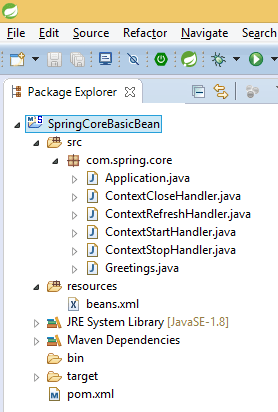
Application Listener can generically declare the event type that it is interested in. When registered with a Spring Application Context, events will be filtered accordingly, with the listener getting invoked for matching event objects only.
Application events are available since the very beginning of the Spring framework as a mean for loosely coupled components to exchange information.
package com.spring.core;
import org.springframework.context.ConfigurableApplicationContext;
import org.springframework.context.support.ClassPathXmlApplicationContext;
public class Application {
    public static void main(String[] args) {
        ConfigurableApplicationContext context = new ClassPathXmlApplicationContext("beans.xml");
        context.start();
        Greetings greet = (Greetings) context.getBean("greet");
        System.out.println(greet.getMessage());
        context.refresh();
        context.stop();
        context.close();
    }
}
Output –
Dec 28, 2016 12:48:13 PM org.springframework.context.support.ClassPathXmlApplicationContext prepareRefreshINFO: Refreshing org.springframework.context.support.ClassPathXmlApplicationContext@300ffa5d: startup date [Wed Dec 28 12:48:13 IST 2016]; root of context hierarchyDec 28, 2016 12:48:13 PM org.springframework.beans.factory.xml.XmlBeanDefinitionReader loadBeanDefinitionsINFO: Loading XML bean definitions from class path resource [beans.xml]
Context Refresh Event Received
Context Start Event Received
Hello One
Dec 28, 2016 12:48:13 PM org.springframework.context.support.ClassPathXmlApplicationContext prepareRefreshINFO: Refreshing org.springframework.context.support.ClassPathXmlApplicationContext@300ffa5d: startup date [Wed Dec 28 12:48:13 IST 2016]; root of context hierarchyDec 28, 2016 12:48:13 PM org.springframework.beans.factory.xml.XmlBeanDefinitionReader loadBeanDefinitionsINFO: Loading XML bean definitions from class path resource [beans.xml]
Context Refresh Event Received
Context Stop Event Received
Dec 28, 2016 12:48:13 PM org.springframework.context.support.ClassPathXmlApplicationContext doCloseINFO: Closing org.springframework.context.support.ClassPathXmlApplicationContext@300ffa5d: startup date [Wed Dec 28 12:48:13 IST 2016]; root of context hierarchy
Context Close Event Received
BeanPostProcessor provides a way to perform some operations before creating a spring bean and immediately after creating spring bean. So you can add some logic before and after creating the bean.
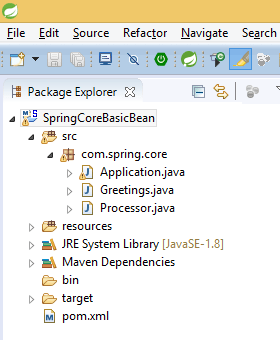
Follow steps to implement spring bean post processors –
Implements BeanPostProcessor in Processor class.
Overrides methods provided by BeanPostProcessor and add some logic whatever you want in postProcessBeforeInitialization and postProcessAfterInitialization
Create bean for the class who implement BeanPostProcessor in .xml file
package com.spring.core;
import org.springframework.context.support.AbstractApplicationContext;
import org.springframework.context.support.ClassPathXmlApplicationContext;
public class Application {
    public static void main(String[] args) {
        AbstractApplicationContext context = new ClassPathXmlApplicationContext("beans.xml");
        Greetings greet = (Greetings) context.getBean("greet");
        System.out.println(greet.getMessage());
        context.registerShutdownHook();
    }
}
Output –
Dec 28, 2016 12:31:32 PM org.springframework.context.support.ClassPathXmlApplicationContext prepareRefreshINFO: Refreshing org.springframework.context.support.ClassPathXmlApplicationContext@300ffa5d: startup date [Wed Dec 28 12:31:32 IST 2016]; root of context hierarchyDec 28, 2016 12:31:32 PM org.springframework.beans.factory.xml.XmlBeanDefinitionReader loadBeanDefinitionsINFO: Loading XML bean definitions from class path resource [beans.xml]
Before Process Initialization Bean - com.spring.core.Greetings@14bf9759 and Name - greet
Init
After Process Initialization Bean - com.spring.core.Greetings@14bf9759 and Name - greet
Hello One
Dec 28, 2016 12:31:32 PM org.springframework.context.support.ClassPathXmlApplicationContext doCloseINFO: Closing org.springframework.context.support.ClassPathXmlApplicationContext@300ffa5d: startup date [Wed Dec 28 12:31:32 IST 2016]; root of context hierarchy
Destroy




 Almighty Java