
- It is represented by the interface org.springframework.beans.factory. It is the main and the basic way to access the Spring container
- It is built upon Factory Design Pattern that contains a collection of beans. The BeanFactory holds Bean Definitions of multiple beans within itself and then instantiates the bean whenever asked for by clients.
- It provides DI / IOC mechanism for the Spring. It is the actual container which instantiates, configures, and manages a number of beans. It loads the beans definitions and their property descriptions from some configuration source (for example, from XML configuration file).
Lets Implement
Using classpath –
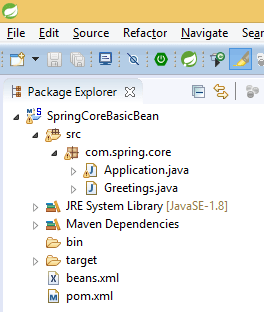
Project structure be like below image

add a dependency on pom.xml file –
<dependency>
     <groupId>org.springframework</groupId>
     <artifactId>spring-context</artifactId>
     <version>4.3.4.RELEASE</version>
</dependency>
bean class “Greetings.java”
package com.spring.core;
public class Greetings {
    private String message;
    public String getMessage() {
        return message;
    }
    public void setMessage(String message) {
        this.message = message;
    }
}
beans.xml file is in classpath so can access using “ClassPathResource” class
<?xml version="1.0" encoding="UTF-8"?>
<!DOCTYPE beans PUBLIC "-//SPRING//DTD BEAN 2.0//EN"
        "http://www.springframework.org/dtd/spring-beans-2.0.dtd">
<beans>
    <bean id="greet" class="com.spring.core.Greetings">
        <property name="message" value="Hello One"></property>
    </bean>
</beans>
Main class
package com.spring.core;
import org.springframework.beans.factory.BeanFactory;
import org.springframework.beans.factory.xml.XmlBeanFactory;
import org.springframework.core.io.ClassPathResource;
public class Application {
    public static void main(String[] args) {
        BeanFactory factory = new XmlBeanFactory(new ClassPathResource("beans.xml"));
        Greetings greet = (Greetings) factory.getBean("greet");
        System.out.println(greet.getMessage());
    }
}
Using File System –
Everything is like above, only class name will change because previously we are reading file from classpath and now reading from file system so we’ll use “FileSystemResource” class
package com.spring.core;
import org.springframework.beans.factory.BeanFactory;
import org.springframework.beans.factory.xml.XmlBeanFactory;
import org.springframework.core.io.FileSystemResource;
public class Application {
    public static void main(String[] args) {
        BeanFactory factory = new XmlBeanFactory(new FileSystemResource("beans.xml"));
        Greetings greet = (Greetings) factory.getBean("greet");
        System.out.println(greet.getMessage());
    }
}
For more detail, Please watch video –
Thanks for reading 🙂
Please Subscribe our you tube channel Almighty Java
 Almighty Java