Upload files to AWS S3 Bucket using Spring Boot and AJAX

Follow below steps to perform this –

Step 1 – Need to add aws-java-sdk maven dependency in pom.xml file

<dependency>
     <groupId>com.amazonaws</groupId>
     <artifactId>aws-java-sdk</artifactId>
     <version>1.11.438</version>
</dependency>

Step 2 – Need to add below properties in ConstantUtils.java file

public static final String END_POINT_URL = "https://s3.us-east-1.amazonaws.com";
public static final String ACCESS_KEY = "AKIAJGDFBUUJF3LAQUWQ";
public static final String SECRET_KEY = "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";
public static final String BUCKET_NAME = "almighty-user-images";

Step 3 – Add below code in controller class

@Autowired
private AmazonService amazonService;

@PostMapping("/upload")
public @ResponseBody String fileUpload(@RequestPart(value="file") MultipartFile multipartFile, @RequestParam(value="editUserId") Long editUserId) {
     return amazonService.uploadFile(multipartFile, userService.findOne(editUserId));
}

Step 4 – create new interface called AmazonService.java

package com.mightyjava.service;
import org.springframework.web.multipart.MultipartFile;
import com.mightyjava.model.User;

public interface AmazonService {
     String uploadFile(MultipartFile multipartFile, User user);
}

Step 5 – Need to implement this interface so create a new class called AmazonServiceImpl.java and inside this under uploadFile method once we get the URL we will set this for user profile photo so it can save this as well.

package com.mightyjava.service.impl;
import java.io.File;
import java.io.FileOutputStream;
import java.io.IOException;
import java.util.Date;
import javax.annotation.PostConstruct;
import org.codehaus.jettison.json.JSONException;
import org.codehaus.jettison.json.JSONObject;
import org.springframework.beans.factory.annotation.Autowired;
import org.springframework.stereotype.Service;
import org.springframework.web.multipart.MultipartFile;
import com.amazonaws.auth.BasicAWSCredentials;
import com.amazonaws.services.s3.AmazonS3;
import com.amazonaws.services.s3.AmazonS3Client;
import com.amazonaws.services.s3.model.CannedAccessControlList;
import com.amazonaws.services.s3.model.PutObjectRequest;
import com.mightyjava.model.User;
import com.mightyjava.service.AmazonService;
import com.mightyjava.service.UserService;
import com.mightyjava.utils.ConstantUtils;

@Service
public class AmazonServiceImpl implements AmazonService {

     private AmazonS3 s3Client;
     @Autowired
     private UserService userService;

     @PostConstruct
     private void initializeAmazon() {
          this.s3Client = new AmazonS3Client(new BasicAWSCredentials(ConstantUtils.ACCESS_KEY, ConstantUtils.SECRET_KEY));
     }

     @Override
     public String uploadFile(MultipartFile multipartFile, User user) {
          String fileUrl = "";
          JSONObject jsonObject = new JSONObject();
          try {
               File file = convertMultipartToFile(multipartFile);
               String fileName = new Date().getTime()+"-"+multipartFile.getOriginalFilename().replace(" ", "_");
               fileUrl = ConstantUtils.END_POINT_URL+"/"+ConstantUtils.BUCKET_NAME+"/"+fileName;
               s3Client.putObject(new PutObjectRequest(ConstantUtils.BUCKET_NAME, fileName, file).withCannedAcl(CannedAccessControlList.PublicRead));
               user.setProfilePhoto(fileUrl);
               userService.addUser(user);
               jsonObject.put("status", "success");
               jsonObject.put("imageUrl", fileUrl);
               jsonObject.put("message", "File Uploaded Successfully.");
          } catch (IOException | JSONException e) {
               e.printStackTrace();
          }
          return jsonObject.toString();
     }

     private File convertMultipartToFile(MultipartFile file) throws IOException {
          File convertFile = new File(file.getOriginalFilename());
          FileOutputStream fos = new FileOutputStream(convertFile);
          fos.write(file.getBytes());
          fos.close();
          return convertFile;
     }
}

Step 6 – Now we will see how to reach request till controller. so add new button called Upload

&lt;form id=&quot;uploadImage&quot; class=&quot;form-horizontal&quot; action=&quot;&quot; method=&quot;post&quot; enctype=&quot;multipart/form-data&quot;&gt;
	&lt;div class=&quot;modal-header&quot;&gt;
		&lt;button type=&quot;button&quot; class=&quot;close&quot; data-dismiss=&quot;modal&quot;&gt;&amp;times;&lt;/button&gt;
		&lt;h4 class=&quot;modal-title&quot;&gt;Upload User Profile for ${userForm.fullName}&lt;/h4&gt;
	&lt;/div&gt;
	&lt;div class=&quot;modal-body&quot;&gt;
		&lt;div class=&quot;form-group&quot;&gt;
			&lt;input type=&quot;hidden&quot; name=&quot;editUserId&quot; value=&quot;${userForm.id}&quot;&gt;
			&lt;label class=&quot;col-md-3 control-label&quot;&gt;Upload File :&lt;/label&gt;
			&lt;div class=&quot;col-md-6&quot;&gt;
				&lt;input type=&quot;file&quot; name=&quot;file&quot; class=&quot;form-control&quot;&gt;
			&lt;/div&gt;
		&lt;/div&gt;
	&lt;/div&gt;
	&lt;div class=&quot;modal-footer&quot;&gt;
		&lt;button type=&quot;submit&quot; class=&quot;btn btn-default&quot;&gt;Upload&lt;/button&gt;
		&lt;button type=&quot;button&quot; class=&quot;btn btn-default&quot; data-dismiss=&quot;modal&quot;&gt;Close&lt;/button&gt;
	&lt;/div&gt;
&lt;/form&gt;

Step 7 – Now when we click on Upload button, using AJAX we will submit the form and call controller upload method

$("#uploadImage").on("submit", function(e) {
     e.preventDefault();
     var formData = new FormData(this);
     $.ajax({
          type:"POST",
          url:"/mightyjava/user/upload",
          data:formData,
          cache:false,
          dataType:"json",
          contentType:false,
          processData:false,
          success:function(data) {
               var title="Upload Confirmation";
               if(data.status == "success") {
                    toastr.success(data.message, title, {
                         closeButton:true
                    });
                    fetchList("user");
                    $("#uploadModal").modal("hide");
                    $("body").removeClass("modal-open");
                    $(".modal-backdrop").remove();
               } else {
                    toastr.error(data.message, title, {
                         allowHtml:true,
                         closeButton:true
                    });
               }
          }
     });
});

That’s it. Here is the demo

1

when you click on Upload Button pop up will open

2

once file selected and click on upload then upload success message will come like below image

3


you can download code from GITHUB

Watch the video, you will get complete understanding.


Create a Facebook App & Login with that in Spring Social and Spring Boot

In this blog we will create our own app and with the help of our own appId and appSecret we will login and fetch some user related data also

So follow below steps to create your own facebook app

Step 1 – Login to developers facebook

5

Step 2 – Under my apps click on Add New App link

7

It will ask you to give display name and email and click on Create App ID button

6

Step 3 – Once app creation is done, you can see dashboard like below image

8

click on setting -> basic

9

so now you can see app id and app secret key.

Add Site URL (http://localhost:8080/) under website section.

10

click on Facebook Login -> Quickstart add website URL in Site URL text box and click on save

11

now we are ready to use this app

Lets start –

Download spring social facebook sample

application.properties

spring.social.facebook.appId=828571534198011
spring.social.facebook.appSecret=92a5af89dcd2d11d73a3e41f46d88ecd

HelloController.java

package hello;

import org.springframework.social.connect.Connection;
import org.springframework.social.connect.ConnectionRepository;
import org.springframework.social.facebook.api.Facebook;
import org.springframework.social.facebook.api.User;
import org.springframework.stereotype.Controller;
import org.springframework.ui.Model;
import org.springframework.web.bind.annotation.GetMapping;
import org.springframework.web.bind.annotation.RequestMapping;

@Controller
@RequestMapping("/")
public class HelloController {

    private Facebook facebook;
    private Connection<Facebook> connection;
    private ConnectionRepository connectionRepository;

    public HelloController(Facebook facebook, ConnectionRepository connectionRepository) {
        this.facebook = facebook;
        this.connectionRepository = connectionRepository;
    }

    @GetMapping
    public String helloFacebook(Model model) {
        connection = connectionRepository.findPrimaryConnection(Facebook.class);
        if (connection == null) {
            return "redirect:/connect/facebook";
        } else {
            facebook = connection.getApi();
            String[] fields = { "id", "name" };
            model.addAttribute("isAuthorized", facebook.isAuthorized());
            model.addAttribute("userProfile", facebook.fetchObject("me", User.class, fields));
            return "hello";
        }
    }
}

hello.html

<html>
	<head>
		<title>Hello Facebook</title>
		<link rel="stylesheet" href="https://maxcdn.bootstrapcdn.com/bootstrap/3.3.7/css/bootstrap.min.css" />
	</head>
	<body>
		<h3>Authorize : <span th:text="${isAuthorized}">Authorize</span></h3>
		<h3>Name, <span th:text="${userProfile.name}">Name</span>!</h3>
	</body>
</html>

Start the server

. ____ _ __ _ _
/\\ / ___'_ __ _ _(_)_ __ __ _ \ \ \ \
( ( )\___ | '_ | '_| | '_ \/ _` | \ \ \ \
\\/ ___)| |_)| | | | | || (_| | ) ) ) )
' |____| .__|_| |_|_| |_\__, | / / / /
=========|_|==============|___/=/_/_/_/
:: Spring Boot :: (v1.5.10.RELEASE)

2018-09-05 14:38:46.457 INFO 14888 --- [ main] hello.Application : Starting Application on INR1601079 with PID 14888 (started by jeetp in C:\Users\jeetp\Downloads\Recycle Bin\gs-accessing-facebook-master\complete)
2018-09-05 14:38:46.466 INFO 14888 --- [ main] hello.Application : No active profile set, falling back to default profiles: default
2018-09-05 14:38:47.384 INFO 14888 --- [ main] ationConfigEmbeddedWebApplicationContext : Refreshing org.springframework.boot.context.embedded.AnnotationConfigEmbeddedWebApplicationContext@78b1cc93: startup date [Wed Sep 05 14:38:47 IST 2018]; root of context hierarchy
2018-09-05 14:38:49.119 INFO 14888 --- [ main] f.a.AutowiredAnnotationBeanPostProcessor : JSR-330 'javax.inject.Inject' annotation found and supported for autowiring
2018-09-05 14:38:49.906 INFO 14888 --- [ main] s.b.c.e.t.TomcatEmbeddedServletContainer : Tomcat initialized with port(s): 9090 (http)
2018-09-05 14:38:49.931 INFO 14888 --- [ main] o.apache.catalina.core.StandardService : Starting service [Tomcat]
2018-09-05 14:38:49.932 INFO 14888 --- [ main] org.apache.catalina.core.StandardEngine : Starting Servlet Engine: Apache Tomcat/8.5.27
2018-09-05 14:38:50.147 INFO 14888 --- [ost-startStop-1] o.a.c.c.C.[Tomcat].[localhost].[/] : Initializing Spring embedded WebApplicationContext
2018-09-05 14:38:50.147 INFO 14888 --- [ost-startStop-1] o.s.web.context.ContextLoader : Root WebApplicationContext: initialization completed in 2787 ms
2018-09-05 14:38:50.451 INFO 14888 --- [ost-startStop-1] o.s.b.w.servlet.ServletRegistrationBean : Mapping servlet: 'dispatcherServlet' to [/]
2018-09-05 14:38:50.458 INFO 14888 --- [ost-startStop-1] o.s.b.w.servlet.FilterRegistrationBean : Mapping filter: 'characterEncodingFilter' to: [/*]
2018-09-05 14:38:50.459 INFO 14888 --- [ost-startStop-1] o.s.b.w.servlet.FilterRegistrationBean : Mapping filter: 'hiddenHttpMethodFilter' to: [/*]
2018-09-05 14:38:50.459 INFO 14888 --- [ost-startStop-1] o.s.b.w.servlet.FilterRegistrationBean : Mapping filter: 'httpPutFormContentFilter' to: [/*]
2018-09-05 14:38:50.460 INFO 14888 --- [ost-startStop-1] o.s.b.w.servlet.FilterRegistrationBean : Mapping filter: 'requestContextFilter' to: [/*]
2018-09-05 14:38:50.933 INFO 14888 --- [ main] s.w.s.m.m.a.RequestMappingHandlerAdapter : Looking for @ControllerAdvice: org.springframework.boot.context.embedded.AnnotationConfigEmbeddedWebApplicationContext@78b1cc93: startup date [Wed Sep 05 14:38:47 IST 2018]; root of context hierarchy
2018-09-05 14:38:51.022 INFO 14888 --- [ main] s.w.s.m.m.a.RequestMappingHandlerMapping : Mapped "{[/],methods=[GET]}" onto public java.lang.String hello.HelloController.helloFacebook(org.springframework.ui.Model)
2018-09-05 14:38:51.025 INFO 14888 --- [ main] s.w.s.m.m.a.RequestMappingHandlerMapping : Mapped "{[/error]}" onto public org.springframework.http.ResponseEntity<java.util.Map<java.lang.String, java.lang.Object>> org.springframework.boot.autoconfigure.web.BasicErrorController.error(javax.servlet.http.HttpServletRequest)
2018-09-05 14:38:51.026 INFO 14888 --- [ main] s.w.s.m.m.a.RequestMappingHandlerMapping : Mapped "{[/error],produces=[text/html]}" onto public org.springframework.web.servlet.ModelAndView org.springframework.boot.autoconfigure.web.BasicErrorController.errorHtml(javax.servlet.http.HttpServletRequest,javax.servlet.http.HttpServletResponse)
2018-09-05 14:38:51.041 INFO 14888 --- [ main] s.w.s.m.m.a.RequestMappingHandlerMapping : Mapped "{[/connect/{providerId}],methods=[POST]}" onto public org.springframework.web.servlet.view.RedirectView org.springframework.social.connect.web.ConnectController.connect(java.lang.String,org.springframework.web.context.request.NativeWebRequest)
2018-09-05 14:38:51.041 INFO 14888 --- [ main] s.w.s.m.m.a.RequestMappingHandlerMapping : Mapped "{[/connect/{providerId}],methods=[DELETE]}" onto public org.springframework.web.servlet.view.RedirectView org.springframework.social.connect.web.ConnectController.removeConnections(java.lang.String,org.springframework.web.context.request.NativeWebRequest)
2018-09-05 14:38:51.042 INFO 14888 --- [ main] s.w.s.m.m.a.RequestMappingHandlerMapping : Mapped "{[/connect/{providerId}],methods=[GET],params=[error]}" onto public org.springframework.web.servlet.view.RedirectView org.springframework.social.connect.web.ConnectController.oauth2ErrorCallback(java.lang.String,java.lang.String,java.lang.String,java.lang.String,org.springframework.web.context.request.NativeWebRequest)
2018-09-05 14:38:51.042 INFO 14888 --- [ main] s.w.s.m.m.a.RequestMappingHandlerMapping : Mapped "{[/connect/{providerId}],methods=[GET]}" onto public java.lang.String org.springframework.social.connect.web.ConnectController.connectionStatus(java.lang.String,org.springframework.web.context.request.NativeWebRequest,org.springframework.ui.Model)
2018-09-05 14:38:51.042 INFO 14888 --- [ main] s.w.s.m.m.a.RequestMappingHandlerMapping : Mapped "{[/connect],methods=[GET]}" onto public java.lang.String org.springframework.social.connect.web.ConnectController.connectionStatus(org.springframework.web.context.request.NativeWebRequest,org.springframework.ui.Model)
2018-09-05 14:38:51.042 INFO 14888 --- [ main] s.w.s.m.m.a.RequestMappingHandlerMapping : Mapped "{[/connect/{providerId}],methods=[GET],params=[oauth_token]}" onto public org.springframework.web.servlet.view.RedirectView org.springframework.social.connect.web.ConnectController.oauth1Callback(java.lang.String,org.springframework.web.context.request.NativeWebRequest)
2018-09-05 14:38:51.042 INFO 14888 --- [ main] s.w.s.m.m.a.RequestMappingHandlerMapping : Mapped "{[/connect/{providerId}/{providerUserId}],methods=[DELETE]}" onto public org.springframework.web.servlet.view.RedirectView org.springframework.social.connect.web.ConnectController.removeConnection(java.lang.String,java.lang.String,org.springframework.web.context.request.NativeWebRequest)
2018-09-05 14:38:51.043 INFO 14888 --- [ main] s.w.s.m.m.a.RequestMappingHandlerMapping : Mapped "{[/connect/{providerId}],methods=[GET],params=}" onto public org.springframework.web.servlet.view.RedirectView org.springframework.social.connect.web.ConnectController.oauth2Callback(java.lang.String,org.springframework.web.context.request.NativeWebRequest)
2018-09-05 14:38:51.076 INFO 14888 --- [ main] o.s.w.s.handler.SimpleUrlHandlerMapping : Mapped URL path [/webjars/**] onto handler of type [class org.springframework.web.servlet.resource.ResourceHttpRequestHandler]
2018-09-05 14:38:51.076 INFO 14888 --- [ main] o.s.w.s.handler.SimpleUrlHandlerMapping : Mapped URL path [/**] onto handler of type [class org.springframework.web.servlet.resource.ResourceHttpRequestHandler]
2018-09-05 14:38:51.136 INFO 14888 --- [ main] o.s.w.s.handler.SimpleUrlHandlerMapping : Mapped URL path [/**/favicon.ico] onto handler of type [class org.springframework.web.servlet.resource.ResourceHttpRequestHandler]
2018-09-05 14:38:51.839 INFO 14888 --- [ main] o.s.j.e.a.AnnotationMBeanExporter : Registering beans for JMX exposure on startup
2018-09-05 14:38:51.914 INFO 14888 --- [ main] s.b.c.e.t.TomcatEmbeddedServletContainer : Tomcat started on port(s): 8080 (http)
2018-09-05 14:38:51.919 INFO 14888 --- [ main] hello.Application : Started Application in 6.684 seconds (JVM running for 10.542)

Open the URL - http://localhost:8080/

Here is the first page, click on Connect to Facebook button

1

after click it will ask to login to facebook, Enter username, password and click on login button

2

It will show page like below image - Connected to Facebook

3

Now click on here link. after clicking output is like below image, show authorize true and show the login person name.

4

To see live demo watch below video and you will get complete understanding

Thanks for reading 🙂

Please Subscribe our you tube channel Almighty Java

Angular and Grails Integration Part-3

To integrate Grails framework with Angular JS Follow belows steps

Step 1 – Create Grails Project

Step 2 – Delete some default folder like remove all folder from assets, delete main.gsp page and remove everything from index.gsp

Step 3 – You need angular.min.js and angular-ui-router.js file.

After download put js file under web-app/js and for angular create folder “angular” Add below code in index.gsp page

<!DOCTYPE html>
<html ng-app="angModule">
    <head>
        <script type="text/javascript" src="js/angular/angular.min.js"></script>
        <script type="text/javascript" src="js/angular/angular-ui-router.js"></script>
        <script type="text/javascript" src="js/angular/application.js"></script>
        <script type="text/javascript" src="js/angular/controller/UserController.js"></script>
        <script type="text/javascript" src="js/angular/service/UserService.js"></script>
    </head>
    <body>
        <ui-view></ui-view>
    </body>
</html>

Step 4 – Create a js file under “angular” folder and put below code in application.js file

var app = angular.module("angModule", [ "ui.router" ]).config(
    function($stateProvider, $urlRouterProvider) {
        $urlRouterProvider.otherwise("/user");
        $stateProvider
            .state("user", {
                url : "/user",
                templateUrl : "html/user.html",
        });
    }
});

Step 5 – Create a controller folder then under that create UserController.js file and put below code

app.controller("UserController", function($controller, $rootScope, $scope, $location, UserService) {
    $scope.register = function(user) {
        UserService.register(user).then(function(response) {
            alert(response.data.message)
            $location.path("/");
            $scope.userList();
        });
    } 
    $scope.userList = function() {
        UserService.userList().then(function(response) {
            $scope.users = response.data.users;
        });
    }
});

Step 6 – Create a service folder then under that create UserService.js file and put below code

app.factory('UserService', function($http) {
    var factory = {};
    factory.register = function(user) {
        return $http.post('user/register', user).success(function(data) {
            return data;
        });
    }   
    factory.userList = function() {
        return $http.get("user/userList").success(function(data) {
            return data;
        });
    }   
    return factory;
});

Step 7 – Create a controller under Controller directory and put the below code

package com.angular.grails
class User {
    String userName
    String fullName
    String password
    static constraints = {
        userName nullable: false
        fullName nullable:false
        password nullable:false
    }
    @Override
    public String toString() {
        return "User [userName=" + userName + ", fullName=" + fullName
        + ", password=" + password + "]";
    } 
}

Step 8 – Create a controller under Controller directory and put the below code

package com.angular.grails
import grails.converters.JSON
class UserController { 
    def userService
    def register = {
        def resp = [:]
        User user = new User()
        user.setUserName(request.JSON.userName)
        user.setFullName(request.JSON.fullName)
        user.setPassword(request.JSON.password)
        userService.register(user)
        resp.message = "user added successfully."
        render resp as JSON
    } 
    def userList = {
        def resp = [:]
        resp.users = userService.findAllUser()
        render resp as JSON
    }
}

Step 9 – Create a service under Service directory and put the below code

package com.angular.grails
import grails.transaction.Transactional
@Transactional
class UserService {
    void register(User user) {
        user.save()
    }
    def findAllUser() {
        return User.findAll()
    }
}

Step 10 – Create a html page under “web-app/html” user.html

<div ng-controller="UserController">
    <form ng-submit="register(user)">
        User Name <input type="text" ng-model="user.userName"/> 
        Full Name <input type="text" ng-model="user.fullName"/>
        Password <input type="password" ng-model="user.password"/> 
        <input type="submit" value="Register"/>
    </form>
    <a href="javascript:void(0);" ng-click="userList()">User List</a>
    <div ng-hide="!users.length">
        <table>
            <thead>
                <tr>
                    <th>Full Name</th>
                    <th>User Name</th>
                    <th>Password</th>
                </tr>
            </thead>
            <tbody>
                <tr ng-repeat="user in users"> 
                    <td>{{user.fullName}}</td>
                    <td>{{user.userName}}</td>
                    <td>{{user.password}}</td>
                </tr>
            </tbody>
        </table>
    </div>
</div>

Run the application using “run-app”

To see live demo watch below video

Angular and Grails Integration Part-2

To integrate Grails framework with AngularJs Follow belows steps

Step 1 – Create Grails Project

Step 2 – Delete some default folder like remove all folder from assets, delete main.gsp page and remove everything from index.gsp

Step 3 – You need angular.min.js and angular-ui-router.js file.

After download put js file under web-app/js and for angular create folder “angular” Add below code in index.gsp page

<!DOCTYPE html>
<html ng-app="angModule">
    <head>
        <script type="text/javascript" src="js/angular/angular.min.js"></script>
        <script type="text/javascript" src="js/angular/angular-ui-router.js"></script>
        <script type="text/javascript" src="js/angular/application.js"></script>
        <script type="text/javascript" src="js/angular/controller/UserController.js"></script>
        <script type="text/javascript" src="js/angular/service/UserService.js"></script>
    </head>
    <body>
        <ui-view></ui-view>
    </body>
</html>

Step 4 – Create a js file under “angular” folder and put below code in application.js file

var app = angular.module("angModule", [ "ui.router" ]).config(
    function($stateProvider, $urlRouterProvider) {
        $urlRouterProvider.otherwise("/user");
        $stateProvider
          .state("user", {
             url : "/user",
             templateUrl : "html/user.html",
        });
    }
 });

Step 5 – Create a controller folder then under that create UserController.js file and put below code

app.controller("UserController", function($controller, $rootScope, $scope, $location, UserService) {
    $scope.register = function(user) {
        UserService.register(user).then(function(response) {
            alert(response.data.message)
            $location.path("/");
        });
    }
});

Step 6 – Create a service folder then under that create UserService.js file and put below code

app.factory('UserService', function($http) {
    var factory = {};
    factory.register = function(user) {
        return $http.post('user/register', user).success(function(data) {
           return data;
        });
    }
    return factory;
});

Step 7 – Create a controller under Controller directory and put the below code

package com.angular.grails

import grails.converters.JSON

class UserController {
    def register = {
       def resp = [:]
       println request.JSON
       resp.message = "User Register Successfully."
       render resp as JSON
    }
}

Step 8 – Create a html page under “web-app/html” user.html

<div ng-controller="UserController">
    <form ng-submit="register(user)">
        User Name <input type="text" ng-model="user.userName"/> 
        Full Name <input type="text" ng-model="user.fullName"/>
        Password <input type="password" ng-model="user.password"/> 
        <input type="submit" value="Register"/>
    </form>
</div>

To see live demo watch below video

Angular and Grails Integration Part-1

To integrate Grails framework with Angular JS Follow below steps

Step 1 – Create Grails Project

Step 2 – Delete some default folder like remove all folder from assets, delete main.gsp page and remove everything from index.gsp

Step 3 – You need angular.min.js and angular-ui-router.js file.

After download put js file under web-app/js and for angular create folder “angular” Add below code in index.gsp page

<!DOCTYPE html>
<html ng-app="angModule">
 <head>
  <script type="text/javascript" src="js/angular/angular.min.js"></script>
  <script type="text/javascript" src="js/angular/angular-ui-router.js"></script>
  <script type="text/javascript" src="js/angular/application.js"></script>
 </head>
 <body>
  <ui-view></ui-view>
 </body>
</html>

Step 4 – Create a js file under “angular” folder and put below code in application.js file

var app = angular.module("angModule", [ "ui.router" ]).config(
 function($stateProvider, $urlRouterProvider) {
  $urlRouterProvider.otherwise("/user");
  $stateProvider
   .state("user", {
    url : "/user",
    templateUrl : "html/user.html",
   })
 });

Step 5 – Create a HTML page under “web-app/html” user.html put some message like “Hello World”

To see live demo watch below video

Thanks for reading

Facebook Login using Spring Social & Spring Boot

You can download sample application created by Spring developer – gs-accessing-facebook

Here is the code sample which they added to implement Facebook Login

pom.xml – need to add below dependencies

<dependency>
    <groupId>org.springframework.boot</groupId>
    <artifactId>spring-boot-starter-thymeleaf</artifactId>
</dependency>
<dependency>
    <groupId>org.springframework.social</groupId>
    <artifactId>spring-social-facebook</artifactId>
</dependency>

application.properties

spring.social.facebook.appId=233668646673605
spring.social.facebook.appSecret=33b17e044ee6a4fa383f46ec6e28ea1d

HelloController.java

package hello;

import org.springframework.social.connect.ConnectionRepository;
import org.springframework.social.facebook.api.Facebook;
import org.springframework.social.facebook.api.PagedList;
import org.springframework.social.facebook.api.Post;
import org.springframework.stereotype.Controller;
import org.springframework.ui.Model;
import org.springframework.web.bind.annotation.GetMapping;
import org.springframework.web.bind.annotation.RequestMapping;

@Controller
@RequestMapping("/")
public class HelloController {

    private Facebook facebook;
    private ConnectionRepository connectionRepository;

    public HelloController(Facebook facebook, ConnectionRepository connectionRepository) {
        this.facebook = facebook;
        this.connectionRepository = connectionRepository;
    }

    @GetMapping
    public String helloFacebook(Model model) {
        if (connectionRepository.findPrimaryConnection(Facebook.class) == null) {
            return "redirect:/connect/facebook";
        }
        model.addAttribute("facebookProfile", facebook.userOperations().getUserProfile());
        PagedList<Post> feed = facebook.feedOperations().getFeed();
        model.addAttribute("feed", feed);
        return "hello";
    }
}

hello.html

<html>
	<head>
		<title>Hello Facebook</title>
	</head>
	<body>
		<h3>Hello, <span th:text="${facebookProfile.name}">Some User</span>!</h3>
		
		<h4>Here is your feed:</h4>
		
		
from wrote:

message text


</body> </html>

To see live demo watch below video –

Thanks for reading 🙂

Please Subscribe our you tube channel Almighty Java

Internationalization (i18n) and Localization (L10n) in Spring MVC

Add beans in applicationContext.xml or in spring-servlet.xml file

<bean id="messageSource" class="org.springframework.context.support.ResourceBundleMessageSource"  p:basenames="messages"/> 
<!-- http://localhost:9090/springweb/?locale=en --> 
<!-- http://localhost:9090/springweb/?locale=es -->    
<mvc:interceptors>            
     <bean class="org.springframework.web.servlet.i18n.LocaleChangeInterceptor" p:paramName="locale" />    
</mvc:interceptors>        
<bean id="localeResolver" class="org.springframework.web.servlet.i18n.SessionLocaleResolver" />

Now you just need to add messages_**.properties files in resources folder

messages_en.properties

welcome.message=Welcome Page
legend.login=Login

label.new.user=New User
label.login=Login
label.user=User
label.users=Users
label.userId=User Id
label.userName=User Name
label.password=password
label.home=Home

label.save=Save
label.list=List
label.add=Add
label.edit=Edit
label.delete=Delete

placeholder.userId=Enter User Id
placeholder.userName=Enter User Name
placeholder.password=Enter Password

messages_es.properties

welcome.message=Pagina de

label.new.user=Nuevo usuario
label.login=Iniciar sesión
label.user=Usuario
label.users=Usuarios
label.userId=Identidad de usuario
label.userName=Nombre de usuario
label.password=contraseña
label.home=Casa

label.save=Salvar
label.list=Lista
label.add=Añadir
label.edit=Editar
label.delete=Borrar

placeholder.userId=Introduzca el ID de usuario
placeholder.userName=Introduzca su nombre de usuario
placeholder.password=Introducir la contraseña

That’s it so you can create different links to convert the language or hit the respected URL and localization takes care of automatically.

If you feel any difficulty then download the code from Git

If you want to see live demo then watch below videos

Thanks for reading 🙂

Please Subscribe our you tube channel Almighty Java

How to integrate Ehcache with Spring MVC?

What is Ehcache?

Ehcache is an open source, a standards-based cache that boosts performance, offloads your database, and simplifies scalability. It’s the most widely-used Java-based cache because it’s robust, proven, full-featured, and integrates with other popular libraries and frameworks.

For more details visit link

Ehcache

Follow below steps to integrate Ehcache with Spring –

Step 1 – Add the dependency in pom.xml file

<dependency> 
      <groupId>net.sf.ehcache</groupId> 
      <artifactId>ehcache-core</artifactId> 
      <version>2.6.9</version> 
</dependency>

Step 2 – Create separate XML file for cache and create beans for cacheManager and ehCache

<?xml version="1.0" encoding="UTF-8"?>
<beans xmlns="http://www.springframework.org/schema/beans" 
     xmlns:p="http://www.springframework.org/schema/p" 
     xmlns:cache="http://www.springframework.org/schema/cache" 
     xmlns:xsi="http://www.w3.org/2001/XMLSchema-instance" 
     xsi:schemaLocation="http://www.springframework.org/schema/beans  
     http://www.springframework.org/schema/beans/spring-beans.xsd 
     http://www.springframework.org/schema/cache  
     http://www.springframework.org/schema/cache/spring-cache.xsd">
     <cache:annotation-driven/> 
     <bean id="cacheManager" class="org.springframework.cache.ehcache.EhCacheCacheManager"> 
         <property name="cacheManager" ref="ehcache" /> 
     </bean>
     <bean id="ehcache" class="org.springframework.cache.ehcache.EhCacheManagerFactoryBean"> 
         <property name="configLocation" value="classpath:cache/ehcache.xml" /> 
     </bean>
</beans>

Step 3 – Create ehcache.xml file under cache directory

<?xml version="1.0" encoding="UTF-8"?>
<ehcache xmlns:xsi="http://www.w3.org/2001/XMLSchema-instance" 
     xsi:noNamespaceSchemaLocation="http://ehcache.org/ehcache.xsd" 
     updateCheck="true" monitoring="autodetect" dynamicConfig="true"> 
     <cache name="users" 
            maxEntriesLocalHeap="5000" 
            maxEntriesLocalDisk="1000" 
            eternal="false" 
            diskSpoolBufferSizeMB="20" 
            timeToIdleSeconds="200" 
            timeToLiveSeconds="500" 
            memoryStoreEvictionPolicy="LFU" 
            transactionalMode="off"> 
            <persistence strategy="localTempSwap" /> 
     </cache>
</ehcache>

Step 4 – Use @Cacheable with the proper cache name

@Cacheable(value="users") 
public List<User> userList() { 
     return userDao.findAll(); 
}

You can download code from GitHub Spring Web

that’s it. if you want to live demo then please watch below video

Thanks for reading 🙂

Please Subscribe our you tube channel Almighty Java


How to Execute Spring Batch Manually?

 What is Spring Batch?

  • A lightweight, comprehensive batch framework designed to enable the development of robust batch applications vital for the daily operations of enterprise systems.
  • Spring Batch provides reusable functions that are essential in processing large volumes of records, including logging/tracing, transaction management, job processing statistics, job restart, skip, and resource management.
  • It also provides more advanced technical services and features that will enable extremely high-volume and high-performance batch jobs through optimization and partitioning techniques.
  • Simple as well as complex, high-volume batch jobs can leverage the framework in a highly scalable manner to process significant volumes of information.

Features

  • Transaction management
  • Chunk-based processing
  • Declarative I/O
  • Start/Stop/Restart
  • Retry/Skip
  • Web-based administration interface (Spring Batch Admin)

How to execute Spring Batch Manually?

  • The Job Tier is responsible for the overall execution of a batch job.
  • It sequentially executes batch steps, ensuring that all steps are in the correct state and all appropriate policies are enforced.
  • The job tier is entirely concerned with maintaining the three job stereotypes: Job, JobInstance, and JobExecution.
  • The JobLauncher interacts with the JobRepository in order to create a JobExecution, and the Job stores the JobExecution using the repository.

What is Job Repository?

  • Job Repository is responsible for the persistence of batch meta-data entities.
  • SimpleJobRepository is the implementation of JobRepository that stores JobInstances, JobExecutions, and StepExecutions using the injected DAOs.
  • A FactoryBean (MapJobRepositoryFactoryBean) that automates the creation of a SimpleJobRepository using non-persistent in-memory DAO implementations.
  • This repository is only really intended for use in testing and rapid prototyping. In such settings, you might find that ResourcelessTransactionManager is useful (as long as your business logic does not use a relational database).
  • Not suited for use in multithreaded jobs with splits, although it should be safe to use in a multi-threaded step.

What is Job Launcher?

  • Simple interface for controlling jobs, including possible ad-hoc executions, based on different runtime identifiers.
  • It is extremely important to note that this interface makes absolutely no guarantees about whether or not calls to it are executed synchronously or asynchronously.
  • A simple implementation of the JobLauncher interface. The Spring Core TaskExecutor interface is used to launch a Job.
  • This means that the type of executor set is very important. If a SyncTaskExecutor is used, then the job will be processed within the same thread that called the launcher.
  • Care should be taken to ensure any users of this class understand fully whether or not the implementation of TaskExecutor used will start tasks synchronously or asynchronously.
  • The default setting uses asynchronous task executor. There is only one required dependency of this Launcher, a JobRepository. The JobRepository is used to obtain a valid JobExecution.
  • The Repository must be used because the provided Job could be a restart of an existing JobInstance, and only the Repository can reliably recreate it.

What is Job Registry and Registry bean post processor?

  • A runtime service registry interfaces for registering job configurations by name.
  • MapJobRegistry is a Simple, thread-safe, map-based implementation of JobRegistry.
  • A BeanPostProcessor that registers Job beans with a JobRegistry. Include a bean of this type along with your job configuration, and use the same JobRegistry as a JobLocator when you need to locate a Job to launch.

What is Tasklet in Spring?

  • It is a strategy for processing in a step.
  • Declares the implementation of the Tasklet strategy indirectly by configuring a chunk or directly by configuring a reference to the Tasklet interface.
  • Given the current context in the form of a step contribution, do whatever is necessary to process this unit inside a transaction.
  • Implementations return RepeatStatus.FINISHED if finished.
  • If not they return RepeatStatus.CONTINUABLE. On failure throws an exception.

Let’s Implement

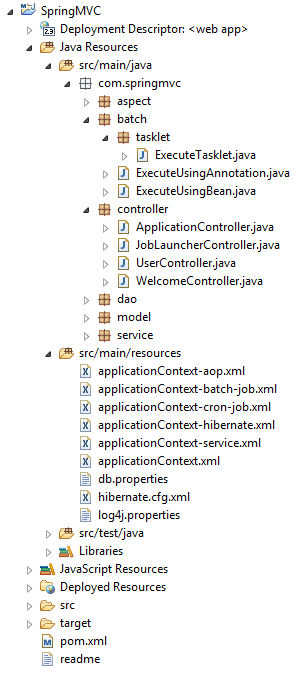
Project structure be like below image

batch

pom.xml

<!-- Spring Batch dependency -->
<dependency>
      <groupId>org.springframework.batch</groupId>
      <artifactId>spring-batch-core</artifactId>
      <version>3.0.3.RELEASE</version>
</dependency>

applicationContext-batch-job.xml

<?xml version="1.0" encoding="UTF-8"?>
<beans xmlns="http://www.springframework.org/schema/beans" 
      xmlns:batch="http://www.springframework.org/schema/batch"  
      xmlns:task="http://www.springframework.org/schema/task" 
      xmlns:xsi="http://www.w3.org/2001/XMLSchema-instance" 
      xsi:schemaLocation="http://www.springframework.org/schema/beans  
      http://www.springframework.org/schema/beans/spring-beans.xsd 
      http://www.springframework.org/schema/task        
      http://www.springframework.org/schema/task/spring-task.xsd        
      http://www.springframework.org/schema/batch  
      http://www.springframework.org/schema/batch/spring-batch.xsd">
      <bean id="transactionManager" class="org.springframework.batch.support.transaction.ResourcelessTransactionManager" />
      <bean id="jobRepository" class="org.springframework.batch.core.repository.support.MapJobRepositoryFactoryBean"> 
            <property name="transactionManager" ref="transactionManager" /> 
      </bean>
      <bean id="jobLauncher" class="org.springframework.batch.core.launch.support.SimpleJobLauncher"> 
            <property name="jobRepository" ref="jobRepository" /> 
      </bean>
      <bean id="jobRegistry" class="org.springframework.batch.core.configuration.support.MapJobRegistry" />
      <bean class="org.springframework.batch.core.configuration.support.JobRegistryBeanPostProcessor"> 
            <property name="jobRegistry" ref="jobRegistry" /> 
      </bean>
      <batch:job id="executeTasklet"> 
            <batch:step id="trackParamsRuleStep"> 
                  <batch:tasklet> 
                        <bean class="com.springmvc.batch.tasklet.ExecuteTasklet"> 
                              <property name="params" ref="params" /> 
                        </bean> 
                  </batch:tasklet> 
            </batch:step> 
      </batch:job>
      <bean id="params" class="java.util.HashMap" />
</beans>

JobLauncherController.java

package com.springmvc.controller;
import org.codehaus.jettison.json.JSONObject;
import org.springframework.batch.core.JobParametersBuilder;
import org.springframework.batch.core.configuration.JobRegistry;
import org.springframework.batch.core.launch.JobLauncher;
import org.springframework.beans.factory.annotation.Autowired;
import org.springframework.http.HttpStatus;
import org.springframework.http.MediaType;
import org.springframework.stereotype.Controller;
import org.springframework.web.bind.annotation.RequestBody;
import org.springframework.web.bind.annotation.RequestMapping;
import org.springframework.web.bind.annotation.RequestMethod;
import org.springframework.web.bind.annotation.ResponseStatus;
@Controller@RequestMapping(value = "/job")
public class JobLauncherController { 
     private static final String TIME = "time"; 
     private static final String JOB_PARAM = "job";

     @Autowired 
     private JobLauncher jobLauncher; 
     @Autowired 
     private JobRegistry jobRegistry;

     @RequestMapping(value = "/joblauncher", method = RequestMethod.POST, consumes = MediaType.APPLICATION_JSON_VALUE) 
     @ResponseStatus(HttpStatus.ACCEPTED) 
     public void launchJob(@RequestBody String info) throws Exception { 
        JSONObject parseJson = new JSONObject(info); 
        JobParametersBuilder builder = extractParameters(parseJson); 
        jobLauncher.run(jobRegistry.getJob(parseJson.getString(JOB_PARAM)), builder.toJobParameters()); 
     }

     private JobParametersBuilder extractParameters(JSONObject parseJson) throws Exception { 
          JobParametersBuilder builder = new JobParametersBuilder(); 
          builder.addLong(TIME, System.currentTimeMillis()).toJobParameters(); 
          builder.addString(JOB_PARAM, parseJson.getString(JOB_PARAM)); 
          return builder; 
     }
}

ExecuteTasklet.java

package com.springmvc.batch.tasklet;
import java.util.Map;
import org.springframework.batch.core.StepContribution;
import org.springframework.batch.core.scope.context.ChunkContext;
import org.springframework.batch.core.step.tasklet.Tasklet;
import org.springframework.batch.repeat.RepeatStatus;
public class ExecuteTasklet implements Tasklet { 
   private Map<Object,String> params;

   public Map<Object,String> getParams() { 
      return params; 
   }
   public void setParams(Map<Object,String> params) { 
      this.params = params;  
   }
   public RepeatStatus execute(StepContribution contribution, ChunkContext chunkContext) throws Exception { 
      Map<?,?> jobParameters = chunkContext.getStepContext().getJobParameters(); params.clear(); 
      for (Map.Entry<?,?> entry : jobParameters.entrySet()) { 
         params.put(entry.getKey(), entry.getValue().toString()); 
      } 
      System.out.println("running job " + params); 
      return RepeatStatus.FINISHED; 
   }
}

Here is the .jsp file so from here we will call the controller so it will start your job based on whatever request you want to proceed.

<html>
   <head> 
     https://code.jquery.com/jquery-1.12.4.min.js 
      
       $(function() { 
         $("#executeManually").click(function() { 
           var data = { "job" : "executeTasklet" }; 
           $.ajax({ 
             type : "POST", 
             datatype : "json", 
             url : "/SpringMVC/job/joblauncher", 
             contentType : "application/json; 
             charset=utf-8", 
             data : JSON.stringify(data), 
             success : function(data, textStatus) { 
               alert("executing"); 
             }, 
             statusCode : { 
               901 : function() { 
                 window.location.href = window.location.href; 
               } 
             } 
         }); 
       }); 
     }); 
   
   </head>
   <body> 
     <a href="javascript:void(0);" id="executeManually">Execute Manually</a>
   </body>
</html>

When you click on Execute Manually button it will call JobLauncherController and start executing job so do whatever operation you want to perform

execute directly using the command

-Dmaven.tomcat.port=8080 tomcat:run

jspjquery request params will contains time and job name – {time=1441533491828, job=executeTasklet}

jsp2Here is the log

log

You can download code from GitHub Spring Web

that’s it. if you want to live demo then please watch below video

Thanks for reading 🙂

Please Subscribe our you tube channel Almighty Java

How to integrate Quartz scheduler in Spring?

Quartz is a full-featured, open source job scheduling system that can be used from smallest apps to large scale enterprise systems.

What is the Quartz Job Scheduling Library?

Quartz is a richly featured, open source job scheduling library that can be integrated within virtually any Java application – from the smallest stand-alone application to the largest e-commerce system. Quartz can be used to create simple or complex schedules for executing tens, hundreds, or even tens-of-thousands of jobs; jobs whose tasks are defined as standard Java components that may execute virtually anything you may program them to do. The Quartz Scheduler includes many enterprise-class features, such as support for JTA transactions and clustering.

Quartz is freely usable, licensed under the Apache 2.0 license.

Follow below steps to integrate Quartz with Spring MVC.

Step 1 – Need to add dependencies to pom.xml file

<dependency>
  <groupId>org.springframework</groupId>
  <artifactId>spring-context-support</artifactId>
  <version>4.3.3.RELEASE</version>
</dependency>
<dependency>
  <groupId>org.quartz-scheduler</groupId>
  <artifactId>quartz</artifactId>
  <version>2.2.1</version>
</dependency>

Step 2 – creates a separate XML file for quartz “spring-quartz.xml” and yes it not necessary.

<?xml version="1.0" encoding="UTF-8"?>
<beans xmlns="http://www.springframework.org/schema/beans"
 xmlns:p="http://www.springframework.org/schema/p"
 xmlns:context="http://www.springframework.org/schema/context"
 xmlns:xsi="http://www.w3.org/2001/XMLSchema-instance"
 xsi:schemaLocation="http://www.springframework.org/schema/beans
         http://www.springframework.org/schema/beans/spring-beans.xsd
         http://www.springframework.org/schema/context
         http://www.springframework.org/schema/context/spring-context.xsd">
<bean id="quartzJob" class="com.mightyjava.quartz.ExecuteUsingQuartz"/>
<bean id="jobFactoryBean" class="org.springframework.scheduling.quartz.MethodInvokingJobDetailFactoryBean"
       p:targetObject-ref="quartzJob" p:targetMethod="run"/>
<bean id="triggerFactoryBean" class="org.springframework.scheduling.quartz.CronTriggerFactoryBean"
       p:jobDetail-ref="jobFactoryBean" p:cronExpression="0/5 * * * * ?"/>
<bean class="org.springframework.scheduling.quartz.SchedulerFactoryBean"
       p:triggers-ref="triggerFactoryBean"/>
</beans>

Step 3 – create a class where logic will stay

package com.mightyjava.quartz;
import java.util.Date;
public class ExecuteUsingQuartz {
   public void run() {
      System.out.println("Executing using quartz in every 15 seconds " + new Date());
   }
}

that’s it. if you want to live demo then please watch below video

Thanks for reading 🙂

Please Subscribe our you tube channel Almighty Java